FOR ENFORCEMENT, WARDENS AND SECURITY

The digital notebook for frontline professionals.

Record incidents while you handle them, share them securely with colleagues and build one file together. No account, and your data stays on your own phone.

Made for
  • Enforcement officers
  • Wardens
  • Public transport officers
  • Shopping centre security officers
  • Park rangers
  • Event security officers
  • Police officers
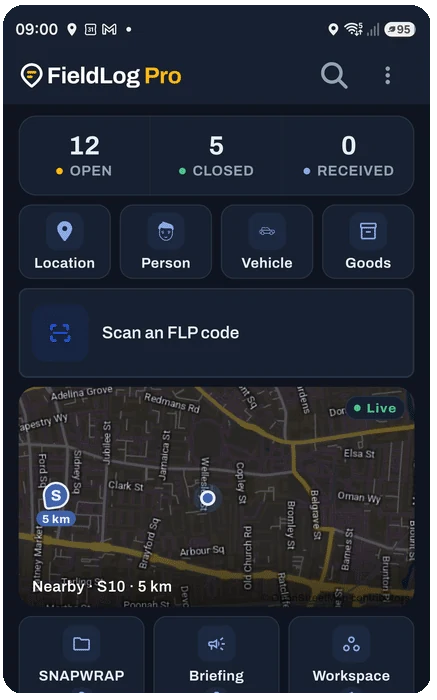
FieldLog Pro home screen with open, closed and received incidents, shortcuts and mapComing soon to Google Play & App Store
WHAT WE SOLVE

Sound familiar?

Without FieldLog Pro

You have to type up your notes again after the shift.

With FieldLog ProRecord as you actPeople, vehicles, property and photos per incident, saved automatically.
Without FieldLog Pro

Information goes through radios, phone calls and scattered chat groups.

With FieldLog ProOne shared fileShare with colleagues, your team or a workspace. Everyone adds to the same place.
Without FieldLog Pro

This morning's briefing is no longer at hand once you're out.

With FieldLog Pro247 briefing and map in your appLink once with a QR code. After that, new 247 briefings arrive automatically and briefing locations appear on your map.
Without FieldLog Pro

New colleagues first need accounts and passwords.

With FieldLog ProNo account, ready to goYour phone is your identity. You connect with a QR code.
HOW IT WORKS

Follow a shift

Example shift of a warden · pick a moment
07:00

Without FieldLog Pro: A briefing on paper or from memory that you no longer have at hand once you're out.

With FieldLog Pro

The 247 briefing is already waiting

The coordinator prepares the 247 briefing and map layers on the desktop. You linked your app once with a QR code, so every new 247 briefing arrives by itself.
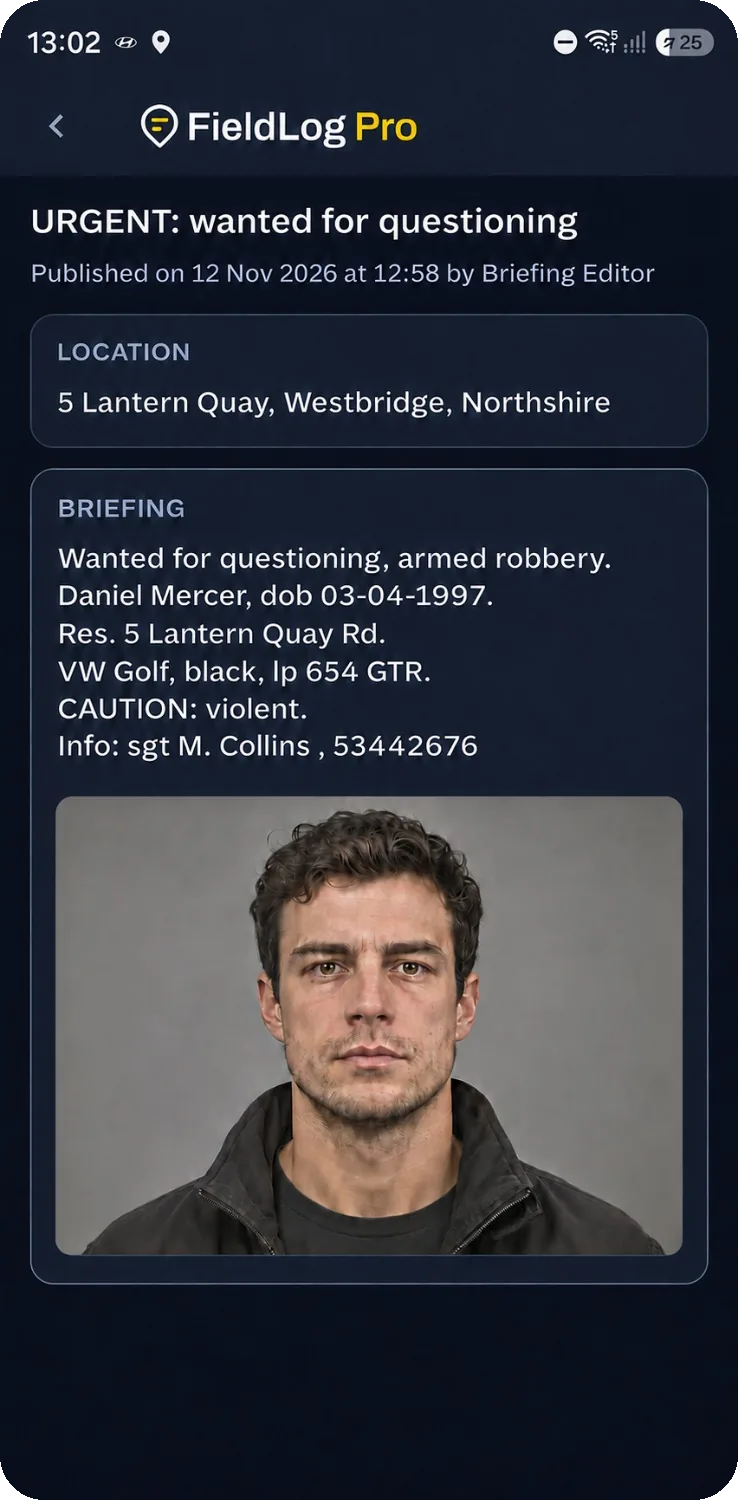
  • 247 briefing & map layers
A briefing with location, details and photo
09:15

Without FieldLog Pro: Asking over the radio where everyone is and who can help.

With FieldLog Pro

Everyone on one map

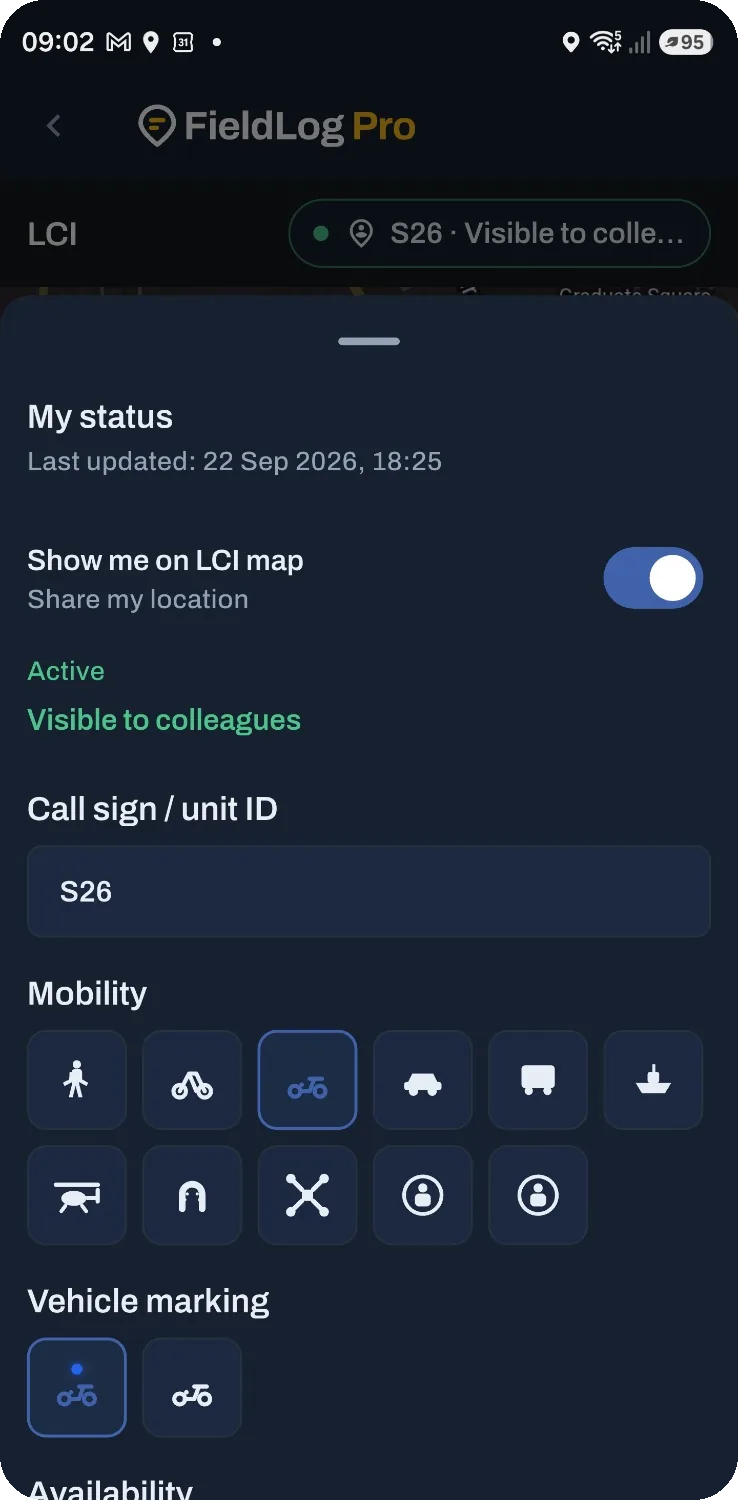
See incidents, briefing points and colleagues with their status: available, in uniform, armed. You decide whether colleagues see your location.

  • One map
  • Status
My status: visibility, call sign and mobility
11:40

Without FieldLog Pro: Keywords in your notebook that you have to write up later.

With FieldLog Pro

Record as you act

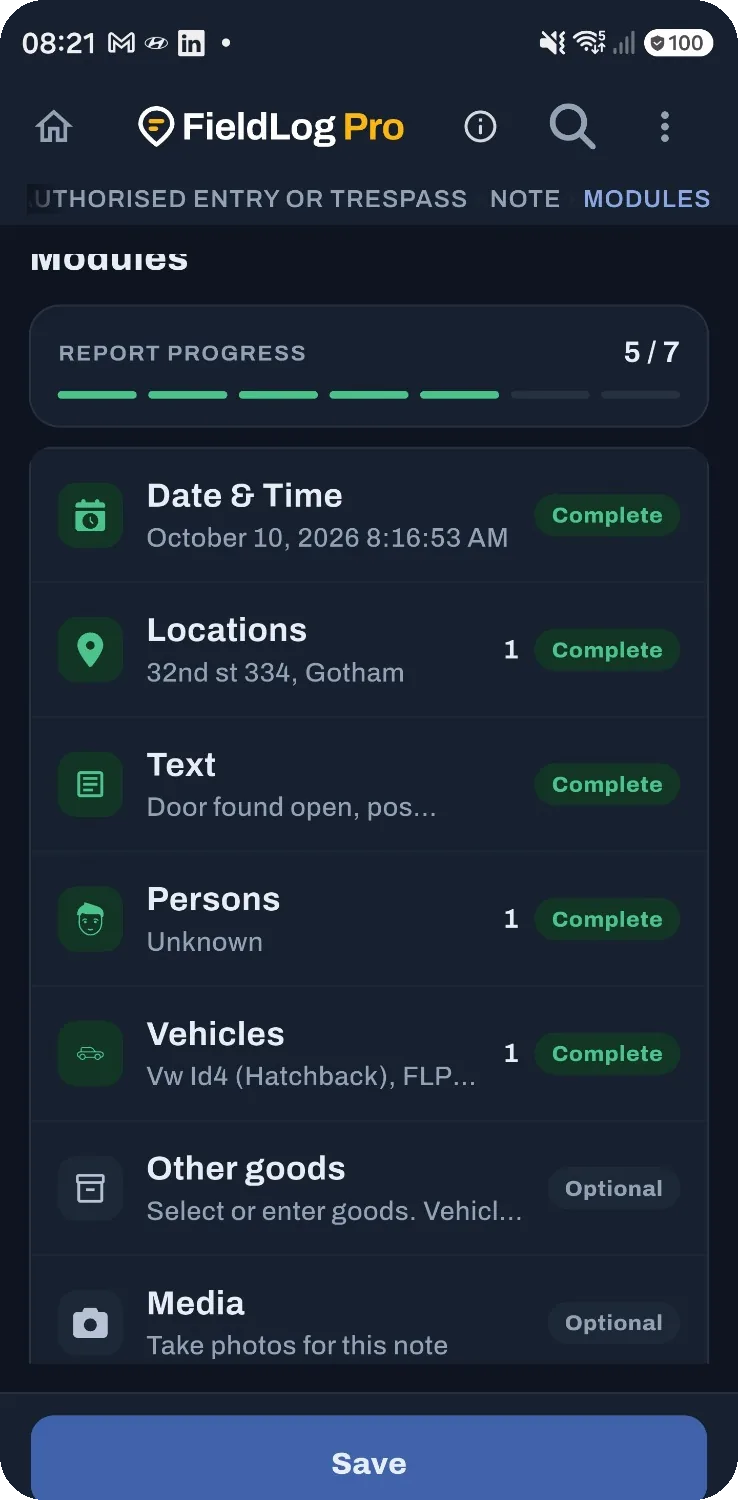
Pick the incident type from your own list and add people, vehicles, property and photos. Scan a number plate or identity document, and CommonSense shows guidance that fits the incident. Everything is saved automatically.

  • Incident recording
  • Scanning
  • CommonSense
An incident with progress per section
11:52

Without FieldLog Pro: Forwarding photos and notes in separate chat messages.

With FieldLog Pro

Share with whoever needs it

Share the incident with a colleague, your team or a workspace. They add to it and you see it straight away.

  • Working together
Open, closed and received incidents
13:30

Without FieldLog Pro: A missed call and a message buried in the group chat.

With FieldLog Pro

A task from the coordinator

A one-off assignment from the desktop arrives as a notification, outside the control room.

  • Tasks
Received tasks on the home screen
15:30

Without FieldLog Pro: Gathering and typing everything up after the shift.

With FieldLog Pro

The record is already there

Related incidents and notes sit in one workspace, with a timeline when you need one.

  • Workspace
Workspace from the home screen
HANDY ON THE GO

Type less, know more

Your hands are often full and the situation keeps moving. So there is little to type, and you get advice at the moment it counts.

Scan instead of typing

Scan a number plate or the machine-readable lines of a passport, ID card or driving licence. The details go straight into the incident record.

ID card reader

Then read the chip of a passport or ID card via NFC, including the photo. For a Dutch ID card, you enter the six-digit code (CAN) from the front.

Speak instead of typing

Dictate your notes and check the text before you insert it. Or record a voice note of up to 5 minutes; it is stored encrypted.

CommonSense · New

The right checklist, on the spot

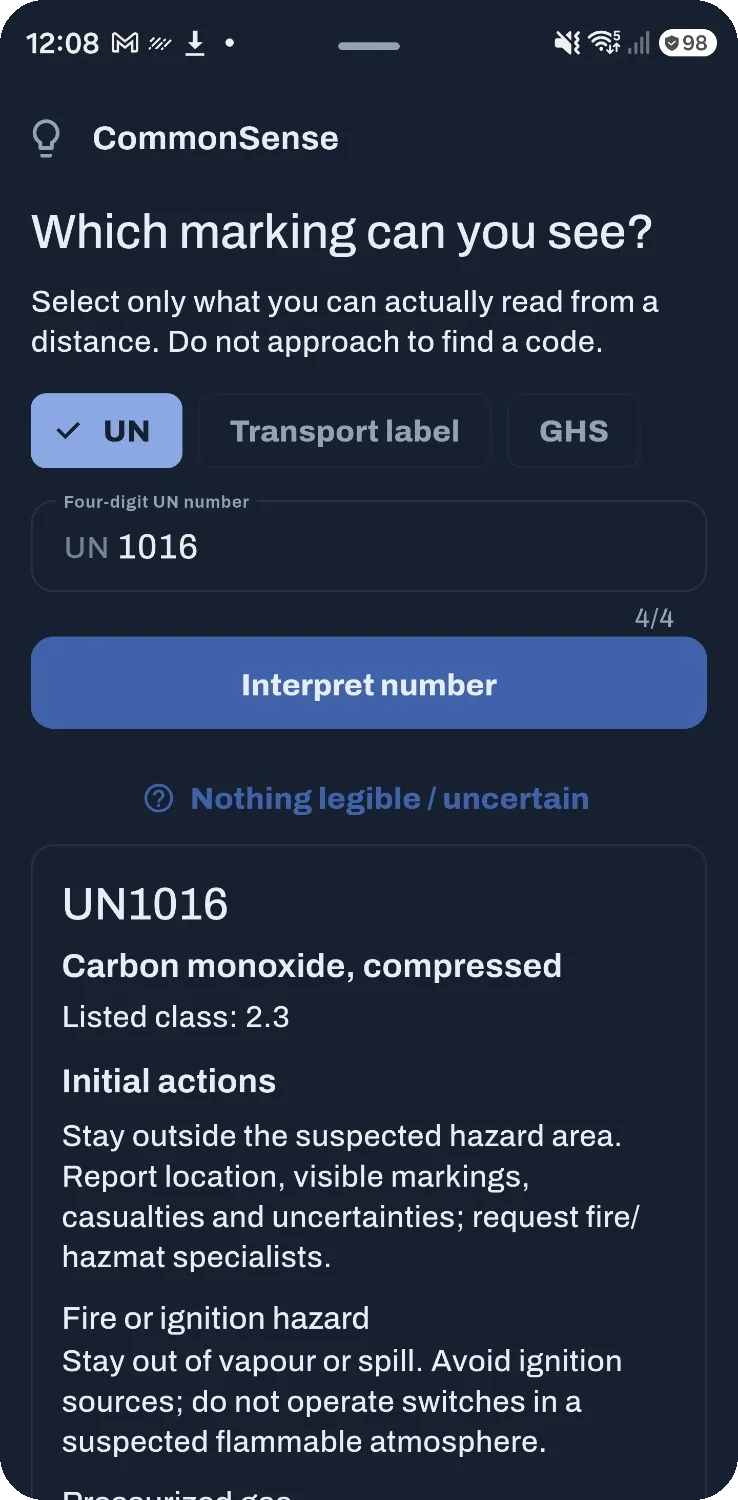
While you work, CommonSense provides guidance that fits the incident: on-scene checklists and good practice, for example at a crime scene or with hazardous materials. This helps you keep track of important steps, even in situations you rarely face.

  • Advice that fits the type of incident
  • Checklists with no obligation to tick
  • Processing stays on your phone
  • Your organisation's own procedures by arrangement
CommonSense interprets a UN number and shows the initial actions for hazardous materials
PHONE & DESKTOP

Two apps, one team

Staff on the street use the app on their phone. The coordinator prepares the work on the desktop.

On your phone

For frontline professionals

  • Record incidents and scan documents
  • Share with colleagues
  • One map with incidents and colleagues
  • Receive 247 briefings and tasks
FieldLog Pro app on the phone
On the desktop

For the coordinator

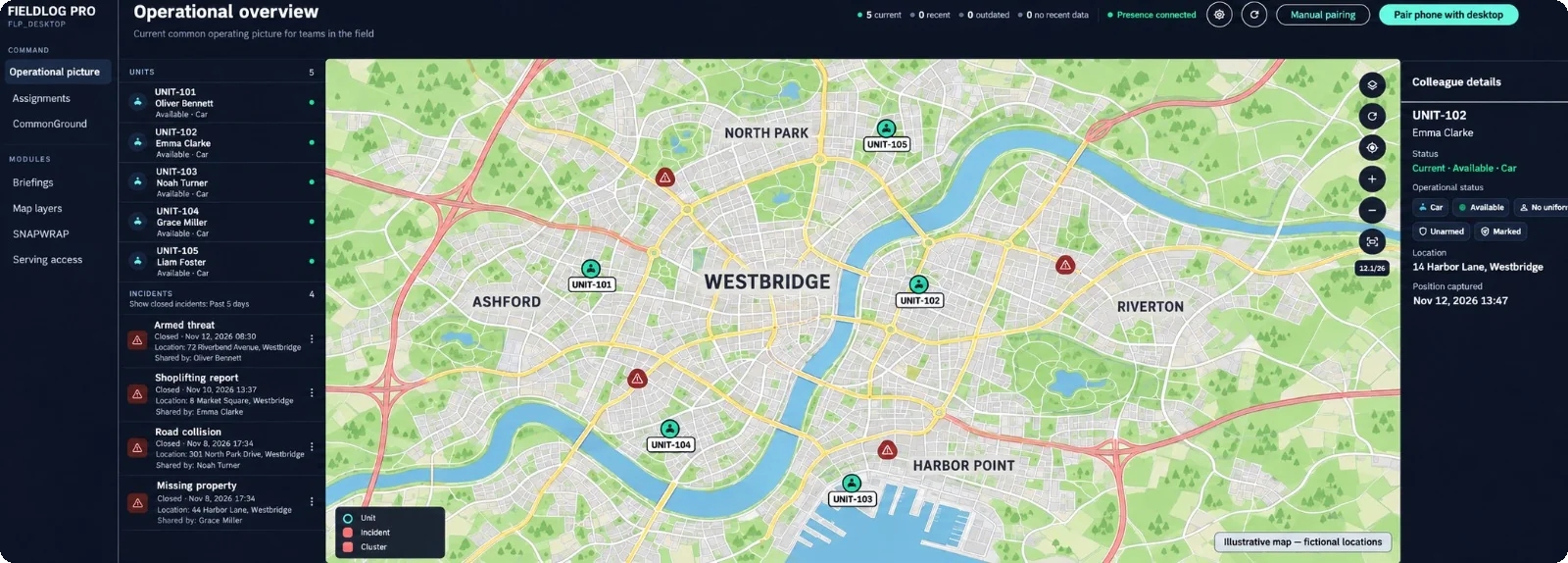
  • Live operational picture: colleagues with their status and shared incidents on one map
  • Prepare 247 briefings and map layers
  • Send assignments to one officer
  • Follow the CommonGround map of an operation; the commander on scene stays in charge
  • Follow SNAPWRAP files, with the timeline of each detention

Runs in the browser. Sign in with your organisation's account, on a linked computer. Phones are linked with a QR code; you only see colleagues who share their location.

The desktop with the operational picture: units with their status, shared incidents and a map
  1. 1The coordinator prepares the 247 briefing on the desktop.
  2. 2Staff link their app once with a QR code.
  3. 3From then on, every 247 briefing arrives by itself and stays up to date.
SECURITY & PRIVACY

How your data stays yours

Content is encrypted before it leaves your phone or computer, and the keys stay with you. That works differently from what you're used to, so here is how.

Phone: your device is your identityThe app has no account and no password. You connect colleagues with a QR code.
Desktop: account and linked browserThe coordinator signs in with the organisation's account. Each browser gets its own certificate; another organisation cannot get in.
Encrypted before sending247 briefings and shared incidents are encrypted on the device. Our servers are 100% EU-hosted and European-owned, and only pass on encrypted content.
The keys stay with youThe keys are on your own phones and computers. Your organisation keeps its root key itself, too. We can never retrieve content.
Honest about what we do seeTechnical data such as timestamps, sender and recipient IDs and message size. Never the content.
A delivery service, not an archiveShared messages are only kept until they have been delivered. You keep official records yourself.
EXTRA FOR SPECIFIC OPERATIONS

Arrests and major operations

The basics are the same for everyone. These situations add extra functions.

CommonGround

On-site coordination

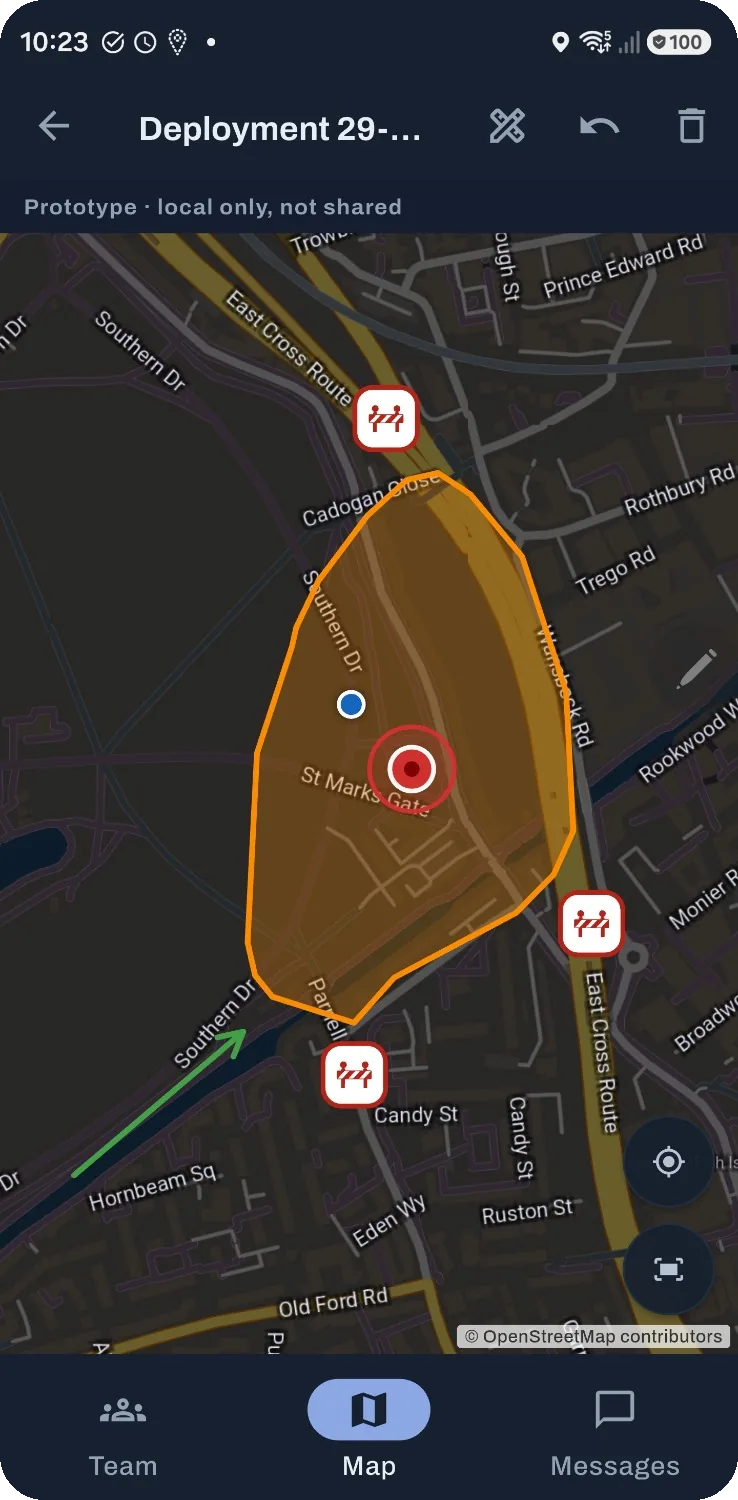
For anyone leading an operation, from police to event security. Team locations, points, areas, arrows, photos and floor plans on one map. Changes reach everyone within seconds.

CommonGround map with a cordoned area, roadblocks and a direction arrow
SNAPWRAP · POLICE

Several arrests at once

Start the record by scanning the cable tie or handcuffs. Every next scan adds a step to the right suspect.

FieldLog Pro draws on experience and best practice from ENLETS, the European Network of Law Enforcement Technology Services.

FieldLog Pro, formerly LEO247 Pro · Developed with experienced officers · In 6 languages

Try FieldLog Pro free for 30 days

Download the app and activate it with a link in your email. You then get every feature for 30 days. You don't enter any payment details, and the trial does not turn into a subscription by itself.

Coming soon to Google PlayComing soon to the App Store

After the trial you choose a subscription in the app. For organisations, we arrange the desktop and licences together with you.

Would you like a message when the app is available, or do you have a question? Fill in the form or email info@leo247.net.

Thank you! We'll get back to you as soon as possible.

Sending failed. Please try again later or email info@leo247.net.

We only use your details to answer your request. Fields marked * are required.